 tsquare
Select
select · Controls · All components
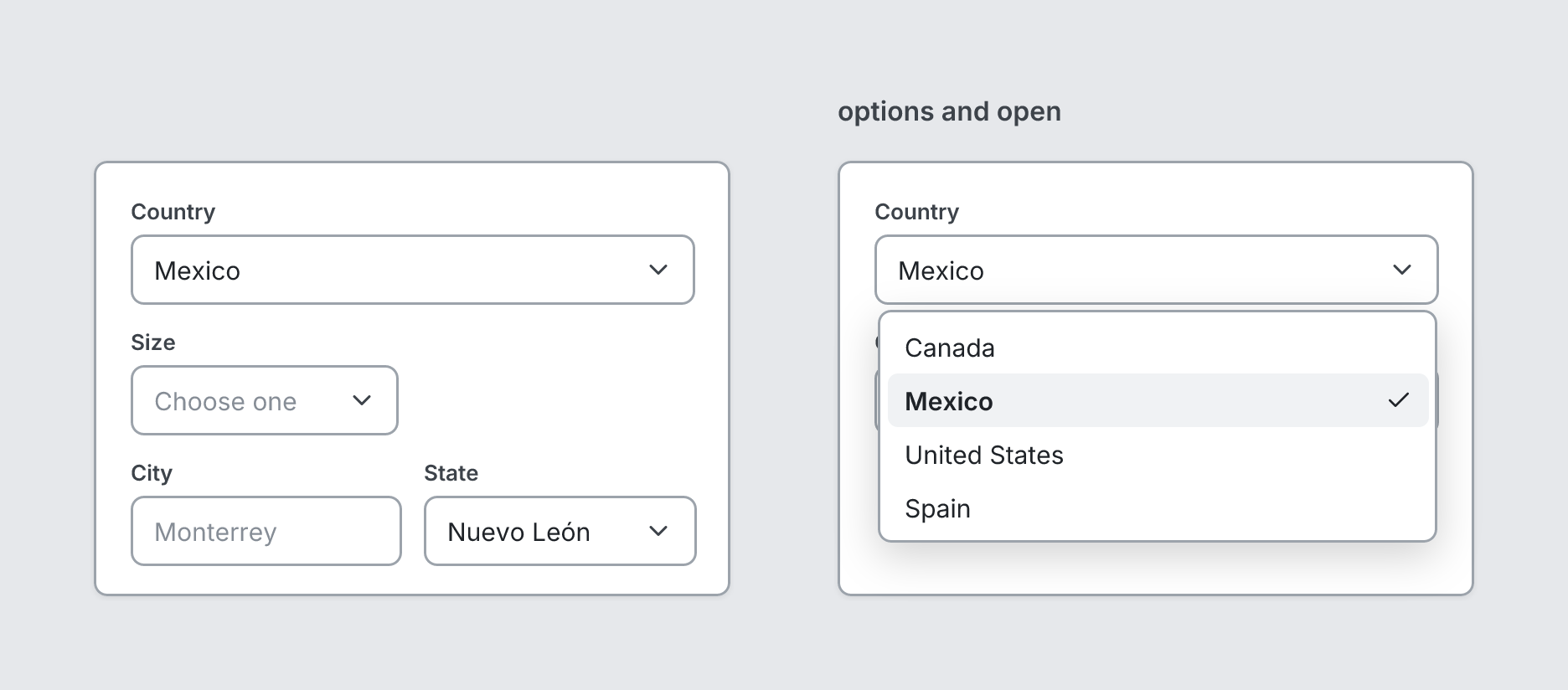
Dropdown field. With options and open, the list shows below it.
board
  screen custom width=380 height=260
    select "Country" value="Mexico"
    select "Size" placeholder="Choose one" width=160
    stack row gap=12
      input "City" placeholder="Monterrey" grow
      select "State" value="Nuevo León" grow
  screen custom "options and open" width=380 height=260
    select "Country" value="Mexico" open options=[Canada, Mexico, United States, Spain]
    input "City" placeholder="Monterrey"
Writing it
- A quoted string sets label:
select "…". openturns open on;no-openturns it off.growturns grow on;no-growturns it off.- Anything else is written
key=value. - Has no children.
Props
| Prop | Values | Notes |
|---|---|---|
label (main text) |
string | |
value |
string | |
placeholder |
string | |
options |
array of string | The choices, shown below the field when open |
open |
boolean | Show the options list |
grow |
boolean | Fill the remaining space in a row |
width |
number, string | Fixed width, e.g. 320. Default fills the space. |
tsquare 0.9.0 · View this page on GitHub