 tsquare
NavBar
navbar · Navigation & data · All components
Top app bar. Place first in a Screen.
board
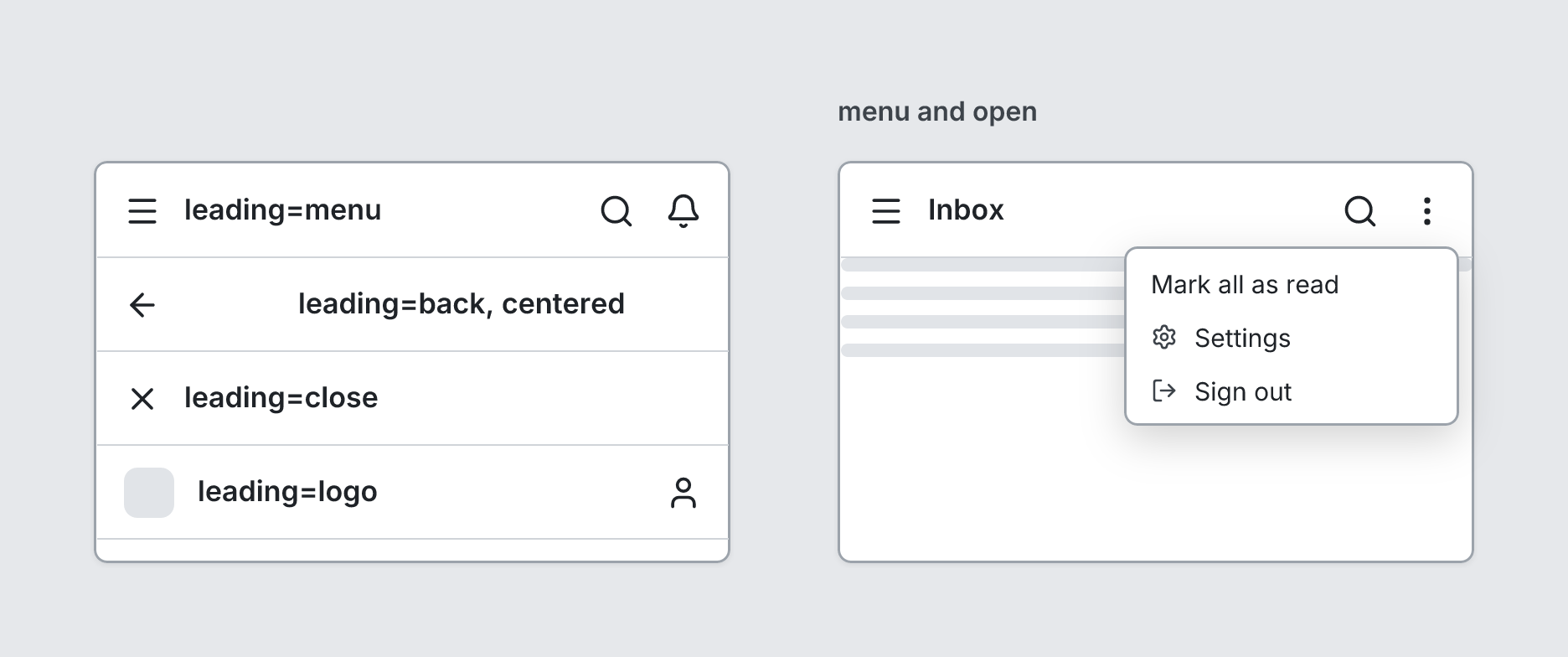
  screen custom width=380 height=240 padding=0 gap=0
    navbar "leading=menu" leading=menu actions=[search, bell]
    navbar "leading=back, centered" leading=back align=center actions=[share]
    navbar "leading=close" leading=close
    navbar "leading=logo" leading=logo actions=[user]
  screen custom "menu and open" width=380 height=240 padding=0 gap=0
    navbar "Inbox" leading=menu actions=[search] open menu=[Mark all as read, {label=Settings icon=settings}, {label=Sign out icon=log-out}]
    text lines=4
Writing it
- A quoted string sets title:
navbar "…". - Bare words set leading:
none,menu,back,close,logo. - Bare words set align:
left,center. openturns open on;no-openturns it off.- Anything else is written
key=value. - Has no children.
Props
| Prop | Values | Notes |
|---|---|---|
title (main text) |
string | |
leading |
none, menu, back, close, logo | |
actions |
array of string | Icon names shown on the right |
align |
left, center | |
menu |
array of string, { label: string, icon: string } | A menu under the last action (adds ⋮ if needed), shown when open |
open |
boolean | Show the menu |
tsquare 0.9.0 · View this page on GitHub